some_var = None
print(f'{some_var=}, {type(some_var)=}')
>>> some_var=None, type(some_var)=<class 'NoneType'>Data type refers to object types that store information and provide some operations on that information.
Compare a function and a number, both are objects but a function stores code and numbers stores numeric data primarily. That is why, function, class etc. are not referred to as data types like int or float which are numeric data types.
Data types are the most critical part of any language. They are used to store, access and operate upon information within code.
Numbers and text are the most fundamental data types.
Some languages like C, distinguish between characters and strings, where strings are treated as sequence of characters. Python has just strings for text, which are a sequence of characters, and can be a sequence of single character.
Then there are collections which provide ways to combine objects to create more complex data. Data types like list, dictionary etc. are provided in higher level languages. Every high level language has its own implementations and syntax with differences, but underlying design principles are the same.
Data Structures and Algorithms part of the book gives a high level background of how the data designs have evolved.
Below tree provides an overview of data types implemented in Python with categories.
builtin in Python and are covered in the bookStandard library is discussed in architecture part of the book: Section 18.2
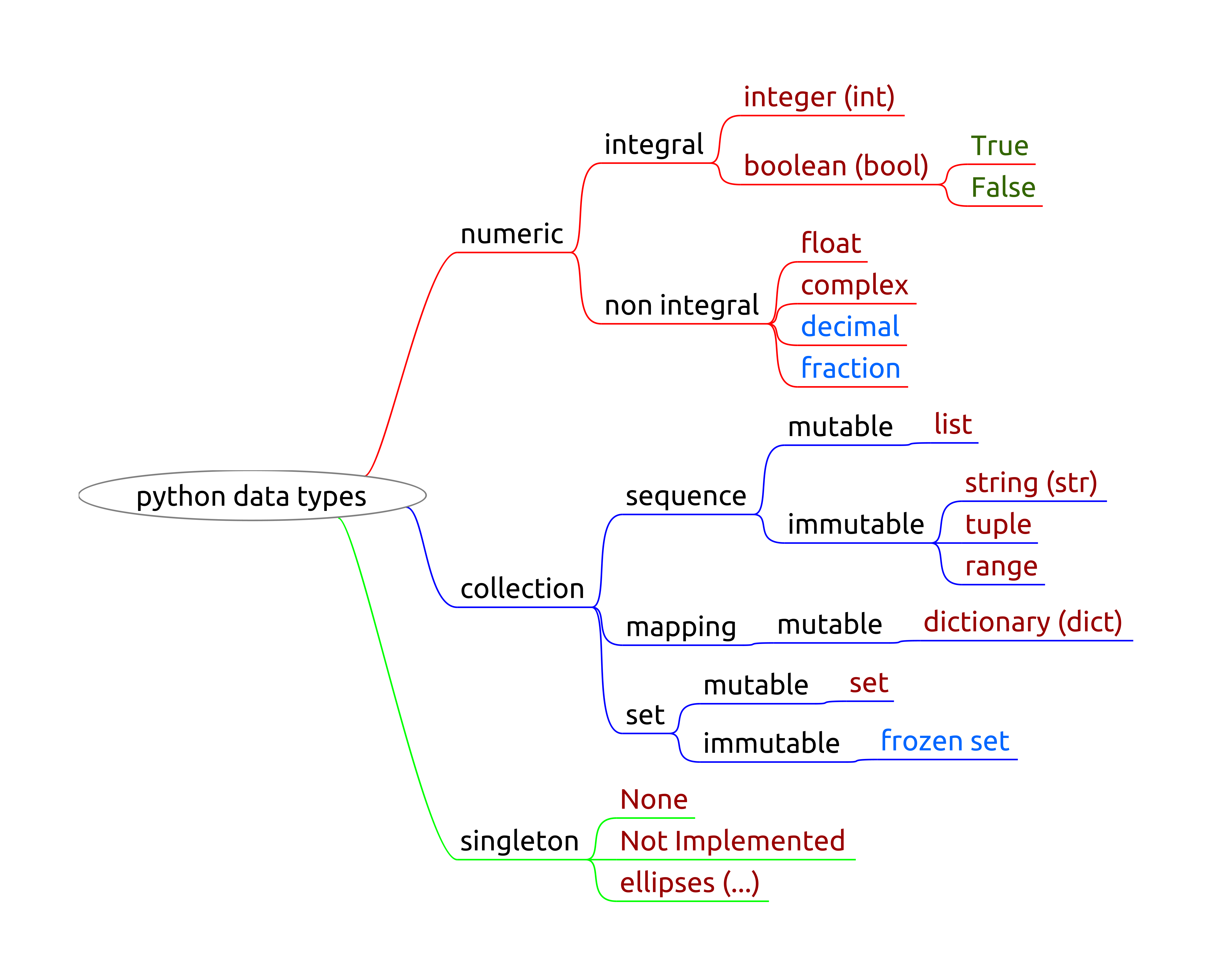
Collection is generally used for collection of objects, and it can be compounded, collection of collection of objects.
Sequence type is a collection of objects with preserved order. In base Python, strings, tuples and lists are sequence type.
Sequences can be mutable or immutable.
Iterable is any collection of objects from which objects can be retrieved one at a time and hence can be looped through. str, tuple, list, dict, set are all iterables.
Sequence is a subset of collections. All sequences are iterables.
Methods available in any sequence type can be categorized as below.
Iterable methods are related to use in looping and are discussed in respective sections.
Based on this categorization, methods are discussed for respective sequence types, string, list and tuple.
All this information is end product of developments in the field of data structures. The DSA part of the book has more information on this, post reading which context of why Python data types behave the way they do will be more clear.
Focus on understanding the underlying concepts and where to look for information in a structured way.
None signifies absence of value. A variable might be defined but not bound to any object. None is a placeholder to signify this state.
It is specially useful in conditionals, to avoid error when checking if a value has been assigned to a variable. This is covered in chapter on conditionals (Section 11.10.1.2.3, Section 15.1.5).
some_var = None
print(f'{some_var=}, {type(some_var)=}')>>> some_var=None, type(some_var)=<class 'NoneType'>| Boolean | Integers | Rationals | Real | Complex |
|---|---|---|---|---|
bool |
int |
fractions.Fraction |
float decimal.Decimal |
complex |
int and float are sufficient
Immutable implies that once an object is created, its value cannot be modified.
For variable assignment this implies that if a variable is storing some number and is assigned another number, a new object is created in background. This does not have any significant impact in case of numeric data types.
Mutability is discussed in more detail at the end of this chapter.
Numbers, integers or floats, can be typed as done in regular math. There are some special syntax available for code readability.
Underscores can be used for better code readability. During execution they are treated normally.
one_million_int = 1_000_000
one_million_float = 1_000_000.00
print(f'{one_million_int = }')
>>> one_million_int = 1000000print(f'{one_million_float = }')>>> one_million_float = 1000000.0Scientific notation can be used with floats. e has to be preceded by a number.
x = [1e-2, 3.314e+5]
print(x)
>>> [0.01, 331400.0]Regular math operations can done using the symbols provided as listed below. Other functions commonly used are
round(x[, n]) is a builtin function providedmath module
math.floor(x), math.ceil(x), math.trunc(x) etc.random module for pseudo random number generations| addition | substraction | multiplication | division | exponents | floored division | modulo |
|---|---|---|---|---|---|---|
+ |
- |
* |
/ |
** |
// |
% |
division always returns floatint and float return floatIncrementing and decrementing a value is provided through operators += and -=.
x += n is same as x = x + nx -= n is same as x = x - nPython uses a special syntax for these common operations and can be extended to below operations.
x *= n is same as x = x * nx /= n is same as x = x / nx **= n is same as x = x ** nfloat
There are some issues and limitations with floating point arithmetic using float.
It is recommended to go through them at python documentation on limitations of using float type.
Below is a basic example of assigning int and float. Note that if decimal is present then, even if number is integer, it is stored as float.
num1 = 10; num2 = 10.0print(f'{num1 = }, {type(num1) = }')>>> num1 = 10, type(num1) = <class 'int'>print(f'{num2 = }, {type(num2) = }')>>> num2 = 10.0, type(num2) = <class 'float'>Operations with int and float return float.
num1 = .25; num2 = 100
num3 = num2 * num1print(f'{num1 = }, {type(num1) = }')>>> num1 = 0.25, type(num1) = <class 'float'>print(f'{num2 = }, {type(num2) = }')>>> num2 = 100, type(num2) = <class 'int'>print(f'{num3 = }, {type(num3) = }')>>> num3 = 25.0, type(num3) = <class 'float'>Objects of type int, within certain range (-5 to 256), are not duplicated for performance reasons.
some_int_1 = 10; some_int_2 = 10some_int_1 is some_int_2>>> TrueThe basic idea is to intern for memory optimizations. Sometimes useful for strings, string interning. This causes surprizes such as this example.
Numeric data types are immutable. In the example below, when some_int is assigned a new value, a new object is created in memory and bound to some_int.
some_int = 10
print(hex(id(some_int)), f'{some_int=}')
>>> 0x75bcb47e0210 some_int=10some_int += 1
print(hex(id(some_int)), f'{some_int=}')>>> 0x75bcb47e0230 some_int=11In Python, a string (str type object) is an immutable sequence of unicode code points. More generally speaking it is an immutable sequence of characters, numbers and symbols.
string is not same as trginsstr'some string'"some string"'''some string'''"""some string"""r character for any method
r"string with \", r'string with \'print changes the way results are displayedstring_1 = 'using single quotes'string_2 = "using double quotes"string_3 = "including \"double quotes\" using double quotes"string_4 = 'including "double quotes" using single quotes'Multiline strings can be created using triple quotes (single/double). A physical new line within a string is not included in the string. The spaces and tabs on a line are included, see string_2 below.
string_1 = """This is a multiline string
with no tabs using triple double quotes"""
string_2 = '''This is a multiline string
with tabs using triple single quotes'''print(string_1)>>> This is a multiline string
>>> with no tabs using triple double quotesprint(string_2)>>> This is a multiline string
>>> with tabs using triple single quotes\)Backslash can be used to insert some special character sequences in a string, which are used by the print and similar functions which can parse such special character sequences.
Examples:
\n\t\' or \"Note in below examples, when variables are output without print function, special character sequences like newline and tab are not parsed and shown as is.
string_1 = "Line 1\nLine 2"
string_2 = "text 1\ttext 2"string_1; print(string_1)>>> 'Line 1\nLine 2'
>>> Line 1
>>> Line 2string_2; print(string_2)>>> 'text 1\ttext 2'
>>> text 1 text 2Raw strings do not escape backslash (\). To create a raw string prepend string with r or R character.
One typical use case is to store windows path which have backslashes. Note in below example since \u has special meaning it gives error while creating the path which contains such sequence of characters.
string_1 = "C:\user\name">>> (unicode error) 'unicodeescape' codec can't decode bytes in position 2-3: truncated \uXXXX escape (<string>, line 1)string_2 = r"C:\User\name"print(string_2)>>> C:\User\nameFormatted strings are used for mixing hard coded text and variable values with formatting.
"text with {0[:fs]} and {1}".format(var1, var2)f-string syntax (Python version >= 3.6)
f'text with {var1[:fs]} and {var2[:fs]}'where
fsto be read as format specifier
This is specially useful in controlling the format of output message from the code. Message could be an error, warning or a regular informative message.
There are a lot of options to play around which can be found at link.
Using old format style.
user_name = "First Last"
user_age = 20
my_string = "Name: {0}\nAge: {1}".format(user_name, user_age)print(my_string)>>> Name: First Last
>>> Age: 20Using old format style with format specifier.
user_name = "First Last"
user_age = 20
user_balance = 1000001
my_string = "Name: {0:^30}\nAge: {1:^30}\nBalance: {2:,.2f}".format(\
user_name, user_age, user_balance)print(my_string)>>> Name: First Last
>>> Age: 20
>>> Balance: 1,000,001.00Using new f-string with format specifier.
user_name = "First Last"
user_age = 20
user_balance = 1000001
my_string = f"Name: {user_name:>15}\nAge: {user_age:>16}\
\nBalance: {user_balance:>12.2f}"print(my_string)>>> Name: First Last
>>> Age: 20
>>> Balance: 1000001.00Below are the 2 major categories of operations a string supports.
Common sequence operations like indexing and slicing are provided with examples below, but are same for all sequence types like tuple and list.
len(s))s1 + s2), for same type sequencess*n or n*s) where n is the number of repeatss[i[, j[, k=1]]])min/maxe in s, e not in ss.index(e)s.count(e)Indexing refers to retrieving elements by position. Slicing refers to extracting subset of elements of a sequence.
s[i]: return item at index is[i:j]: return items from index i to j-1
j - i itemss[i:j:k]: return items from index i to j-1 with step k
k=1 by default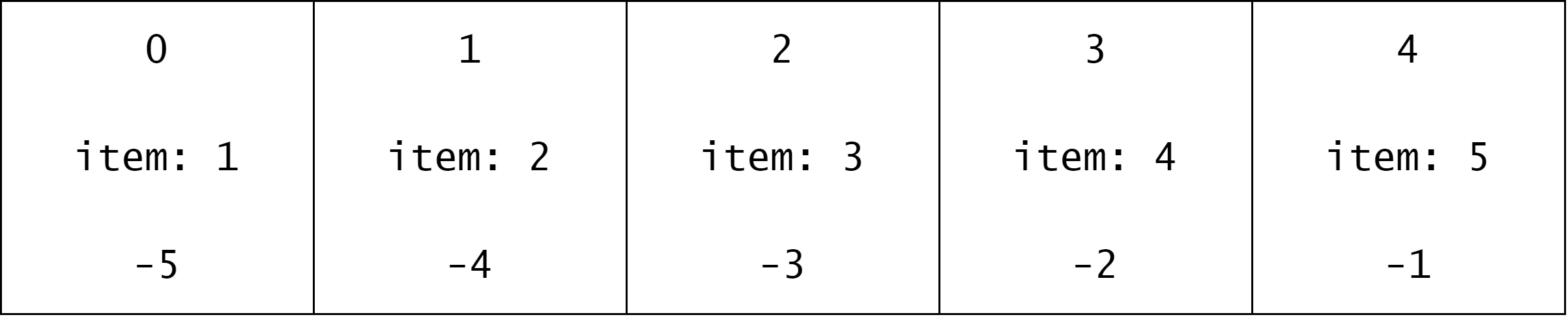
string_1 = "abcdefgh"Enumerate function is used to get pairs of index and elements of a sequence.
print([*enumerate(string_1)])[(0, ‘a’), (1, ‘b’), (2, ‘c’), (3, ‘d’), (4, ‘e’), (5, ‘f’), (6, ‘g’), (7, ‘h’)]
c to fstring_1[2:6]>>> 'cdef'gstring_1[-2]>>> 'g'[(0, ‘a’), (1, ‘b’), (2, ‘c’), (3, ‘d’), (4, ‘e’), (5, ‘f’), (6, ‘g’), (7, ‘h’)]
string_1[-3:]>>> 'fgh'[(0, ‘a’), (1, ‘b’), (2, ‘c’), (3, ‘d’), (4, ‘e’), (5, ‘f’), (6, ‘g’), (7, ‘h’)]
d onwardsstring_1[3:]>>> 'defgh'dstring_1[:4]>>> 'abcd'string_1[:3] + string_1[3:]>>> 'abcdefgh're in standard libraryThe + and * operations can be used with strings, other operators will give error.
Note that operations work with compatible type of objects.
+: concatenate strings
str type objects, i.e. strings*: repeat a string
str and an intsome_str_1 = "some string 1"; some_str_2 = "some string 2"
concat_1_2 = some_str_1 + " " + some_str_2
print(concat_1_2)>>> some string 1 some string 2some_str = "xyz"
print(some_str*5)>>> xyzxyzxyzxyzxyzsome_str_1 = "some string 1"; some_str_2 = "some string 2"
concat_1_2 = some_str_1 * some_str_2>>> Error: TypeError: can't multiply sequence by non-int of type 'str'Tuple is an immutable collection of ordered, heterogeneous objects with below features
tuple()() or tuple()i, or (i,)
(i) will give error, comma is neededi1, i2, i3 or (i1, i2, i3)tuple(iterable[s])t = *l,, t = (*l,), t = (*s, *l)t = (*l) will give error, comma is neededTuple has access to common operations on sequence types with no additional methods.
len(s))s1 + s2), for same type sequencess*n or n*s) where n is the number of repeatss[i[, j[, k=1]]])min/maxe in s, e not in ss.index(e)s.count(e)List is a mutable collection of ordered, heterogeneous objects with following features.
[] or list()[i1, i2, ...], [i1]list(iterable)[*t], [*t,], [*s, *t, *l]There are 2 sets of operations a list supports.
len(s))s1 + s2), for same type sequencess*n or n*s) where n is the number of repeatss[i[, j[, k=1]]])min/maxe in s, e not in ss.index(e)s.count(e)Range is a special iterable to generate a sequence of integers with following characteristics.
range(stop)range(start, stop[, step])
print(range(10))>>> range(0, 10)print(list(range(10)))>>> [0, 1, 2, 3, 4, 5, 6, 7, 8, 9]print([*range(11)])>>> [0, 1, 2, 3, 4, 5, 6, 7, 8, 9, 10]print([*range(1, 11)])>>> [1, 2, 3, 4, 5, 6, 7, 8, 9, 10]print([*range(-1, -11)])>>> []print([*range(-1, -11, -1)])>>> [-1, -2, -3, -4, -5, -6, -7, -8, -9, -10]A dictionary is a mutable mapping type collection of heterogeneous objects mapped to keys that are hashable and unique objects.
in newer versions (>3.9) the order is guaranteed
collection of {key: value} pairs where
A dictionary is useful when a collection of objects is needed with the option to do quick searches based on keys rather than index, unlike sequences.
Concept of hashable objects is introduced in DSA (Section 21.4.4).
using key value pairs separated by commas
d = {"key1": value1, "key2": value2, ...}using type constructor
d = dict([("key1", value1), ("key2", value2), ...])d = dict(key1=value1, key2=value2)create empty dictionary
d = {}d = dict()using comprehensions (covered in Python special features)
if a key is passed multiple times, final value exists
len(d)d.clear()d.copy()d.update([other])key in d / key not in dd.keys() / d.values() / d.items()list(enumerate(d))list(d)list(reversed(d))d[key]d[key] = valued.popitem()d.get(key[, default])d.pop(key[, default])Set is a collection of unique objects with operations related to math sets available, e.g. union, intersection.
In other words, set is a special dictionary with keys only.
In Python specifically, set is an unordered collection of hashable objects. In newer versions (>3.9) the order is guaranteed.
Sets are commonly used for
A set can be created using curly braces with the exception of empty set.
set constructorsome_set = {key1, key2, ...}
some_set = set(iterable)set() constructor
{} creates an empty dictionaryBoolean data type, True and False, is the fundamental unit for implementing boolean conditional expressions.
Boolean comparison operator are used to create elementary conditions. Combination operators allow for building larger conditions by combining multiple conditions.
Conditional control flow blocks, if and match, use conditions.
The idea is based on boolean math. It is essential in controlling the flow of the program based on state of one or more objects in the program.
bool in Python, based on usage, can refer to
bool type is used to represent boolean valuesbool type inherits from int typebool data type can take value from 2 built-in constants, True and False
int values are int(True) = 1 and int(False) = 0 respectivelyBelow are some examples for familiarity.
bool(True), int(True), type(True)>>> (True, 1, <class 'bool'>)bool(False), int(False), type(False)>>> (False, 0, <class 'bool'>)is_<some check>is_int = True
is_int, bool(is_int), int(is_int), type(is_int)>>> (True, True, 1, <class 'bool'>)Boolean comparison operators are used for object comparisons and return True or False, if used with compatible object types.
They are mostly used to create boolean conditions which are used in conditional blocks, if and match..case.
When used with sequence types (string, tuple, list)
==, !=) return True if all elements are equal (not equal) in content|
Operation |
Python Operator |
Comments |
|---|---|---|
|
basic value comparisons |
|
|
|
membership testing |
|
|
|
object id comparison |
|
|
num_1 = 10; num_2 = 15; num_3 = 10.0num_1 == num_2, num_1 < num_2, num_1 <= num_3>>> (False, True, True)cnd = num_1 > num_3print(f"{cnd = }, {type(cnd) = }")>>> cnd = False, type(cnd) = <class 'bool'>Membership testing is more useful for sequence types. Below examples illustrate the usage.
some_string = "abcd"
some_chr_1 = "a"
some_chr_2 = "e"
some_chr_1 in some_string>>> Truesome_chr_2 in some_string>>> Falsesome_long_str = "A reasonably long string"
some_short_str = "long"some_short_str in some_long_str>>> Truesome_list = [1, 2, 3, 4, (1, 2, 3)]
some_tuple = 1, 2, 3
num_1 = 3; num_2 = 5num_1 in some_list>>> Truesome_tuple in some_list>>> Truenum_2 in some_tuple>>> Falsecnd = some_tuple in some_list>>> cnd = True, type(cnd) = <class 'bool'>Since there is a single instance of None type object created in a Python session, object id comparison is useful. None is used to signify if a variable is defined but not assigned a value yet.
Below example illustrates the object id comparison for None type in isolation.
some_var = None
some_var is None
>>> TrueBoolean combination operators use boolean math to provide means of combining multiple comparison operations and conditions to form larger conditions.
|
Operation |
Python Operator |
Comments |
|---|---|---|
|
not |
|
|
|
and |
|
|
|
or |
|
|
|
() |
|
|
a == 10a >= 5 and a <= 10(a > 0 and a < 10) or (a >= 10 and a < 25)()==, !=, <, >, <=, >=)not > and > orand comparisonsa < b < c is same as a < b and b < c()
and and or operators are based on logic gates in boolean math. Truth tables, given below, summarize results for logic gates. 0 and 1 are used instead of False and True for better readability.
|
|
|
|
|
|---|---|---|---|
|
1 |
1 |
1 |
1 |
|
1 |
0 |
0 |
1 |
|
0 |
1 |
0 |
1 |
|
0 |
0 |
0 |
0 |
There are some additional features which Python provides related to boolean data type and are discussed in the Python special features chapter (Section 15.1). They are left from this section to keep the complexity low at this stage.
Iterable unpacking is a special feature in newer versions of Python. Some features were introduced in Python version 2, more features added using PEP-3132: Extended Iterable Unpacking in version 3.
* unpacks remaining itemssome_list = [1, 2, 3, 4]; some_tuple = (1, 2, 3, 4)first_item = some_list[0]
end_items = some_list[1:]print(f'{first_item = }, {end_items = }')>>> first_item = 1, end_items = [2, 3, 4]first_item, *end_items = some_listprint(f'{first_item = }, {end_items = }')>>> first_item = 1, end_items = [2, 3, 4]some_list = [1, 2, 3, 4]; some_tuple = (1, 2, 3, 4)begin_items = some_tuple[0:-1]
last_item = some_tuple[-1]print(f'{begin_items = }, {last_item = }')>>> begin_items = (1, 2, 3), last_item = 4*begin_items, last_item = some_tupleprint(f'{begin_items = }, {last_item = }')>>> begin_items = [1, 2, 3], last_item = 4some_list = [1, 2, 3, 4, 5, 6, 7]; some_tuple = (1, 2, 3, 4, 5, 6, 7)first_item, second_item, *remaining_items, last_item = some_tupleprint(f'{first_item = }, {second_item = }')>>> first_item = 1, second_item = 2print(f'{remaining_items = }, {last_item = }')>>> remaining_items = [3, 4, 5, 6], last_item = 7some_list_1 = [1, 2, 3]; some_tuple_1 = (4, 5);
some_tuple_2 = (*some_list_1, *some_tuple_1)>>> some_tuple_2=(1, 2, 3, 4, 5)** for mapping types - dictionarysome_dict_1 = {"key1": "value1", "key2": "value2.1"}
some_dict_2 = {"key2": "value2.2", "key3": "value3"}
some_dict_3 = {**some_dict_1, **some_dict_2}>>> some_dict_3={'key1': 'value1', 'key2': 'value2.2', 'key3': 'value3'}Modify in-place: any modification to the object does not lead to creation of a new object
Copy on modify: create a new copy of object if modified, opposite of modify in-place
Mutable \(\implies\) modify in-place
Immutable \(\implies\) copy on modify
Modify in-place means any modification to the object does not lead to creation of a new object. For e.g. strings and tuples create new objects on RAM if modified, whereas lists and dictionaries can be modified without creation of new object on RAM.
Since strings and tuples are immutable, elements cannot be assigned new values though indexing. This is unlike mutable types where this is allowed, e.g. lists.
some_string = "abcdee"
some_string[-1] = "f"
>>> Error: TypeError: 'str' object does not support item assignmentsome_tuple = (0, 1, 1)
some_tuple[2] = 2>>> Error: TypeError: 'tuple' object does not support item assignmentsome_list = [0, 1, 5]
some_list[2] = 2
print(some_list)>>> [0, 1, 2]Strings have internal methods that can change elements, but then they follow copy-on-modify.
some_string_1 = "abc"
some_string_2 = some_string_1.replace("a", "b")print(f'{some_string_1=}, {some_string_2=}\n\
{some_string_1 is some_string_2 = }')>>> some_string_1='abc', some_string_2='bbc'
>>> some_string_1 is some_string_2 = Falsesome_string = "abc"; some_string_orig_id = hex(id(some_string))>>> some_string='abc', some_string_orig_id = '0x75bcb4720df0'>>> hex(id(some_string.replace("a", "b"))) = '0x75bca8b839f0'>>> some_string='abc', some_string_orig_id = '0x75bcb4720df0'some_string = some_string.replace("a", "b")>>> some_string='bbc'
>>> hex(id(some_string)) = '0x75bca8b934b0'
>>> some_string_orig_id = '0x75bcb4720df0'Mutable types like lists or dictionaries, when passed around through variable assignment, changes are propagated.
list(iterable)[*iterable]some_list_1 = [1, 2, "a", "b"]
some_list_2 = some_list_1print(f'{some_list_1=}, {some_list_2=}\n{some_list_2 is some_list_1 = }')>>> some_list_1=[1, 2, 'a', 'b'], some_list_2=[1, 2, 'a', 'b']
>>> some_list_2 is some_list_1 = Truesome_list_1[2] = "abc"print(f'{some_list_1=}, {some_list_2=}\n{some_list_2 is some_list_1 = }')>>> some_list_1=[1, 2, 'abc', 'b'], some_list_2=[1, 2, 'abc', 'b']
>>> some_list_2 is some_list_1 = Truesome_list_2[-1] = "xyz"print(f'{some_list_1=}, {some_list_2=}\n{some_list_2 is some_list_1 = }')>>> some_list_1=[1, 2, 'abc', 'xyz'], some_list_2=[1, 2, 'abc', 'xyz']
>>> some_list_2 is some_list_1 = Truesome_list_1 = [1, 2, "a", "b"]
some_list_2 = list(some_list_1)>>> some_list_1=[1, 2, 'a', 'b'], some_list_2=[1, 2, 'a', 'b']
>>> some_list_2 is some_list_1 = Falsesome_list_1[2] = "abc">>> some_list_1=[1, 2, 'abc', 'b'], some_list_2=[1, 2, 'a', 'b']
>>> some_list_2 is some_list_1 = Falsesome_list_1 = [1, 2, "a", "b"]
some_list_2 = [*some_list_1]print(f'{some_list_1=}, {some_list_2=}\n{some_list_2 is some_list_1 = }')>>> some_list_1=[1, 2, 'a', 'b'], some_list_2=[1, 2, 'a', 'b']
>>> some_list_2 is some_list_1 = Falsesome_list_1[2] = "abc"print(f'{some_list_1=}, {some_list_2=}\n{some_list_2 is some_list_1 = }')>>> some_list_1=[1, 2, 'abc', 'b'], some_list_2=[1, 2, 'a', 'b']
>>> some_list_2 is some_list_1 = Falsetuple is immutable in terms of its element objects
the contained object remains mutable if it is mutable
some_list = [1, 2, 3, 4, 5]
some_tuple = (some_list, "some other object")print(f'{some_list=}\n{some_tuple=}\n{some_list is some_tuple[0] = }')>>> some_list=[1, 2, 3, 4, 5]
>>> some_tuple=([1, 2, 3, 4, 5], 'some other object')
>>> some_list is some_tuple[0] = Truesome_list.pop()>>> 5print(f'{some_list=}\n{some_tuple=}\n{some_list is some_tuple[0] = }')>>> some_list=[1, 2, 3, 4]
>>> some_tuple=([1, 2, 3, 4], 'some other object')
>>> some_list is some_tuple[0] = Truesome_list = [1, 2, 3, 4, 5]
some_tuple_1 = *some_list,; some_tuple_2 = tuple(some_list)print(f'{some_list=}\n{some_tuple_1=}\n{some_tuple_2=}')>>> some_list=[1, 2, 3, 4, 5]
>>> some_tuple_1=(1, 2, 3, 4, 5)
>>> some_tuple_2=(1, 2, 3, 4, 5)print(f'{some_list is some_tuple_1 = }')>>> some_list is some_tuple_1 = Falseprint(f'{some_list is some_tuple_2 = }')>>> some_list is some_tuple_2 = Falsesome_list.pop()>>> 5print(f'{some_list=}\n{some_tuple_1=}\n{some_tuple_2=}')>>> some_list=[1, 2, 3, 4]
>>> some_tuple_1=(1, 2, 3, 4, 5)
>>> some_tuple_2=(1, 2, 3, 4, 5)print(f'{some_list is some_tuple_1 = }')>>> some_list is some_tuple_1 = Falseprint(f'{some_list is some_tuple_2 = }')>>> some_list is some_tuple_2 = FalseShallow copy creates a new object for the collection being copied but does not create new objects, if items in the collection are themselves collection. This can have side effects.
Regular copy method available in all collections (string, tuple, list, dictionary) makes a shallow copy.
This works fine if elements of the collection are immutable objects like numbers, strings or tuples, but if there are mutable types like list or dict then propagation will occur.
This might not be desirable at times, so a deep copy is needed which creates new objects for all elements of the original container going through nested structure of the collection recursively.
The standard library has copy module which has deepcopy function to achieve this.
Below example illustrates the point. It is recommended to do experiments to understand the concept.
some_list_1 is a list containing a list, tuple and a dictionary.
some_list_2 is a regular copy, so is different object from some_list_1, but elements point to the same underlying some_list, some_tuple and some_dict
some_list_3 is a regular copy from copy module, so behaves similar to some_list_2.
some_list_4 is a deep copy from copy module, so elements are different objects as well.
import copy
some_list = [1,2,3]; some_tuple = (4, 5); some_dict = {"six": 6, "seven": 7}
some_list_1 = [some_list, some_tuple, some_dict]
some_list_2 = some_list_1.copy()
some_list_3 = copy.copy(some_list_1)
some_list_4 = copy.deepcopy(some_list_1)
>>> some_list_2 is some_list_1 = False>>> some_list_3 is some_list_1 = False>>> some_list_4 is some_list_1 = False>>> some_list_2[0] is some_list_1[0] = True>>> some_list_3[0] is some_list_1[0] = True>>> some_list_4[0] is some_list_1[0] = False