num_1_1 = 1; num_1_2 = 1.015 Python special features
15.1 Conditional expressions
Python has 3 specials concepts related to conditional expressions.
- truthy/falsy: object’s associated truth value
- execution context: decides evaluation result
- short circuit
All 3 concepts can be combined and used in interesting ways which allow some newer cleaner code styles for some common situations that occur while coding.
15.1.1 Truthy and Falsy
- Every object in Python has an associated truth value
- referred to as object’s truth value
- if the object’s truth value is
True\(\implies\) truthy - if the object’s truth value is
False\(\implies\) falsy - hence the object is truthy or falsy
- Below cases are falsy and everything else truthy:
NoneFalse0in any numeric type (e.g. 0, 0.0, 0+0j, …)len(c) = 0: empty collections- custom classes that implement
__bool__or__len__method that returnFalseor0
bool(any_object)function returns object’s truth value
15.1.1.1 Examples
15.1.1.1.1 Numeric type
>>>  num_1_1 =   1, bool(num_1_1) = True,   type(num_1_1) = <class 'int'>
>>>  num_1_2 = 1.0, bool(num_1_2) = True,   type(num_1_2) = <class 'float'>
num_2_1 = 0; num_2_2 = 0.0>>> num_2_1 = 0, bool(num_2_1) = False, type(num_2_1) = <class 'int'>
>>> num_2_2 = 0.0, bool(num_2_2) = False, type(num_2_2) = <class 'float'>15.1.1.1.2 Collections
empty_string = ""; empty_tuple = (); empty_list = []; empty_dict = {}>>> bool(empty_string) = False, bool(empty_tuple) = False
>>> bool(empty_list) = False, bool(empty_dict) = Falsenon_empty_string = "abc"; non_empty_tuple = (1, 2)
non_empty_list = ["a", 1]; non_empty_dict = {"key 1": empty_list}>>> bool(non_empty_string) = True, bool(non_empty_tuple) = True
>>> bool(non_empty_list) = True, bool(non_empty_dict) = True15.1.2 Short circuit
Short circuit is general optimization strategy used by many languages. Main idea is to avoid evaluating unnecessary condition in an boolean combination.
For example in and combination if first condition is false then there is no point checking the second condition. Therefore, second condition of the combination is not evaluated.
Similarly for or combination if the first condition is true then the expression is true in both possible cases, therefore second condition is not evaluated.
15.1.3 Execution context
Python treats conditional expressions differently based on where they are used.
Boolean combinations used in conditional expression, can contain objects directly rather than comparisons. Object’s truth value (bool(<object>)) is used rather than object itself.
15.1.3.1 if/elif conditions
Conditional expression used in if/elif statement’s condition return booleans values (True/False).
Condition can contain object’s as well, bool(object) is used rather than object’s value.
In below code, since x is an empty list it is falsy, bool(x) = False, therefore else block is executed.
x = []
if x:
    print("x is truthy")
else:
    print("x is falsy")
>>> x is falsyIn below code, since x is a string, it is truthy (bool(x) = True), therefore if block is executed.
x = "abcd"
if x:
    print("x is truthy")
else:
    print("x is falsy")
>>> x is truthyIn below example, since bool(x) = False, else block is executed without evaluating bool(y).
x = []; y = None
if x and y:
    print("x and y returned True")
else:
    print("x was false, therefore y was not evaluated")
>>> x was false, therefore y was not evaluated15.1.3.2 Outside if/elif condition
If a boolean combination is used outside if statement and contains objects rather than comparison, then the underlying object’s value is returned, it may or may not be boolean data type.
Below regular comparisons are used outside if block and they are treated as usual, returning boolean values (True/False).
x = []; y = 2
y < 5; y == 2
>>> True
>>> TrueSince boolean combination is used outside if/elif statement, bool(x) is checked and found to be falsy, using short circuit for and, x is returned and y is not evaluated.
x = []; y = 2
x and y
>>> []Since boolean combination is used outside if/elif statement, bool(x) is checked and found to be falsy, using short circuit for or, y is evaluated and returned.
x = []; y = 2
x or y
>>> 215.1.4 Summary
Tables below summarize the scenarios, where 0 and 1 signify boolean True and False.
x |
y |
x and y |
x and y (outside if/elif) |
|---|---|---|---|
| 1 | 1 | 1 | y |
| 1 | 0 | 0 | y |
| 0 | 1 | 0 | x |
| 0 | 0 | 0 | x |
x |
y |
x or y |
x or y (outside if/elif) |
|---|---|---|---|
| 1 | 1 | 1 | x |
| 1 | 0 | 1 | x |
| 0 | 1 | 1 | y |
| 0 | 0 | 0 | y |
For x and y, where x and y can be variables, objects or conditions:
- evaluate
bool(x)- if
bool(x)isTrue- if
x and yis part of a condition inif/elifblock- evaluate and return
bool(y)
- evaluate and return
- if
x and yis not part of a condition inif/elifblock- return
y
- return
- if
- if
bool(x)isFalse- if
x and yis part of a condition inif/elifblock- return
False
- return
- if
x and yis not part of a condition inif/elifblock- return
x
- return
- if
- if
Similarly, for x or y, where x and y can be variables, objects or conditions:
- evaluate
bool(x)- if
bool(x)isTrue- if
x and yis part of a condition inif/elifblock- return
True
- return
- if
x and yis not part of a condition inif/elifblock- return
x
- return
- if
- if
bool(x)isFalse- if
x and yis part of a condition inif/elifblock- evaluate and return
bool(y)
- evaluate and return
- if
x and yis not part of a condition inif/elifblock- return
y
- return
- if
- if
15.1.5 Use cases
15.1.5.1 Iterables
It is common situation where state of an iterable is not known in advance.
For example a list generated by some operation which can result in None or empty list or a list with values. There are some operations to be done only if the list is truthy.
Using the 3 concepts the code can be simplified as below. Both the condition are to ensure that the object is truthy.
Note that len(some_itr) > 0 is used as second condition in and combination. Due to short circuit it is not evaluated if first condition is False, i.e. some_itr is None. If it is used as first condition, it is evaluated always, therefore will give error when the iterable is None.
some_itr =  # some iterable object
if some_itr is not None and len(some_itr) > 0:
    # code block
else:
    # code block
some_itr =  # some iterable object
if some_itr:
    # code block
else:
    # code block
15.1.5.2 Assign default
Another common situation is to assign a default value in case the expected value is falsy.
Below form of assignment will work. If expected_var is truthy, because of short circuit or, it will be returned and assigned to new_var. If it is falsy, default object will be evaluated and returned.
new_var = expected_var or default_object15.2 Comprehensions
Comprehensions are a newer feature in Python which combine the fundamentals of map and filter in a more concise syntax.
They are relevant for iterables, i.e. tuples, lists, sets and dictionaries. Mostly they are used with lists and dictionaries.
Generic idea is
- transformation iteration filter or
- expression loop condition
i.e. map expression to each item in iterable which satisfy the filter.
- Filter/condition is optional
- Comprehensions can be nested
15.2.1 List comprehensions
For list comprehension generic syntax is
[expression using item for item in list if condition on item]
example without filter: list of squares from a list of integers
some_itr = list(range(10))
squared_itr = [item**2 for item in some_itr]
print(some_itr, squared_itr, sep="\n")
>>> [0, 1, 2, 3, 4, 5, 6, 7, 8, 9]
>>> [0, 1, 4, 9, 16, 25, 36, 49, 64, 81]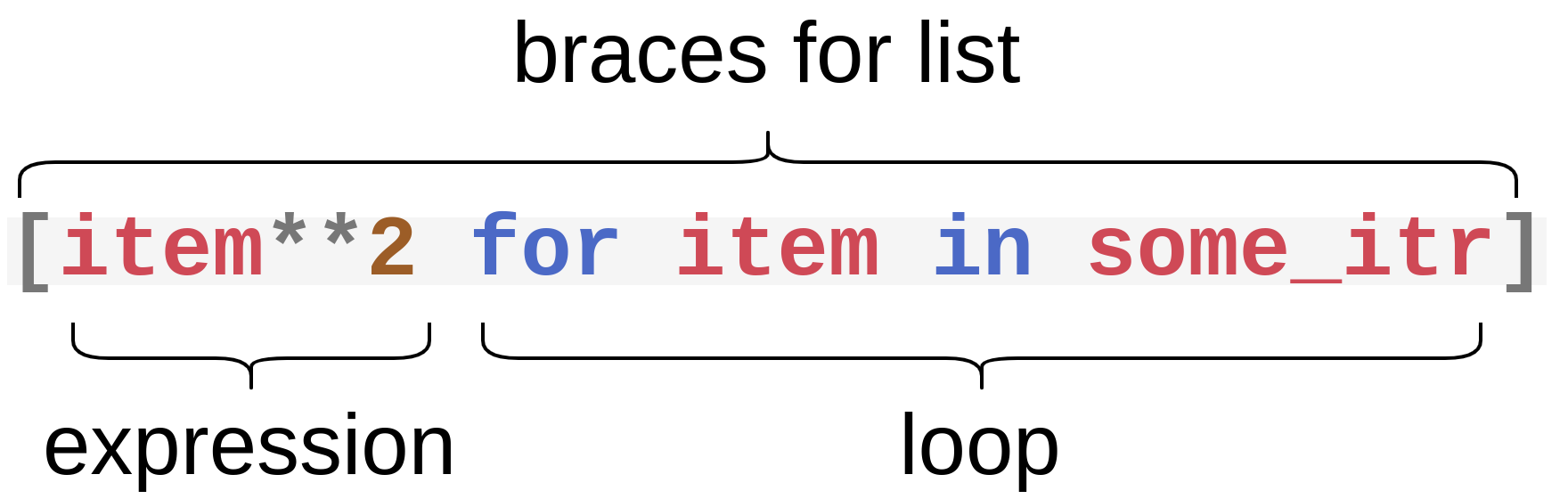
- example with filter: list of squares from a list of integers if integer is even
some_itr = tuple(range(10))
evens_squared_itr = [item**2 for item in some_itr if item % 2 == 0]
print(some_itr, evens_squared_itr, sep="\n")
>>> (0, 1, 2, 3, 4, 5, 6, 7, 8, 9)
>>> [0, 4, 16, 36, 64]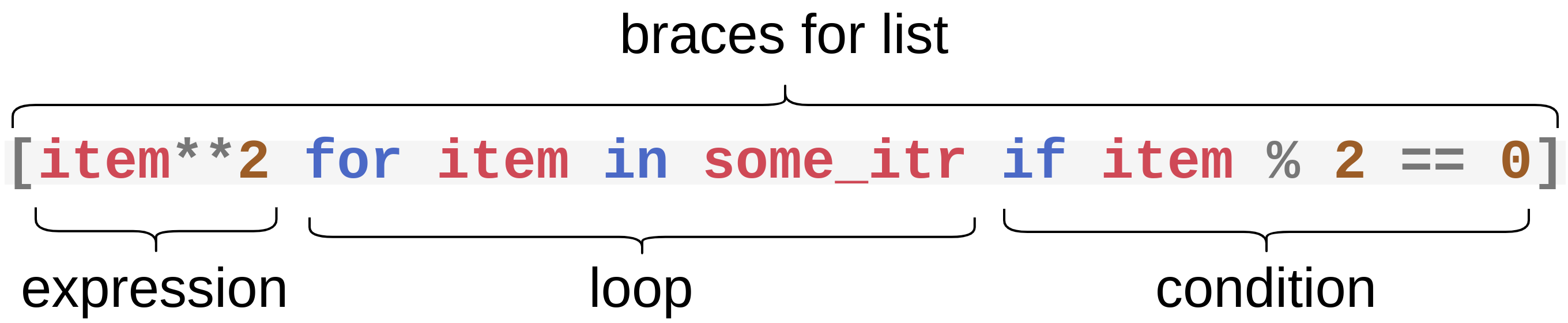
- example with multiple iterables: list of sum of squares of 2 iterables of numbers
t_1 = (*range(1,4),); t_2 = (*range(4,7),)
sum_of_sqrs = [x**2 + y**2 for x, y in zip(t_1, t_2)]
t_1, t_2, sum_of_sqrs
>>> ((1, 2, 3), (4, 5, 6), [17, 29, 45])- example of nested comprehensions: make all possible combinations of letters of 2 strings if they are not equal
string_1 = 'abc'; string_2 = 'axy'
combinations = [l1 + l2 for l1 in string_1 for l2 in string_2 if l1 != l2]
print(combinations)
>>> ['ax', 'ay', 'ba', 'bx', 'by', 'ca', 'cx', 'cy']For better code readability, this can be written as
string_1 = 'abc'; string_2 = 'axy'
combinations = [l1 + l2
                for l1 in string_1
                    for l2 in string_2
                        if l1 != l2]
print(combinations)
>>> ['ax', 'ay', 'ba', 'bx', 'by', 'ca', 'cx', 'cy']This is same as
string_1 = 'abc'; string_2 = 'axy'
combinations = []
for l1 in string_1:
    for l2 in string_2:
        if l1 != l2:
            combinations.append(l1 + l2)
print(combinations)
>>> ['ax', 'ay', 'ba', 'bx', 'by', 'ca', 'cx', 'cy']15.2.2 Tuple, set, dict
To return a tuple instead of a list from a comprehension use tuple constructor instead of square brackets.
For sets and dictionary just use curly braces instead of square brackets.
- example with multiple iterables: tuple of sum of squares of 2 iterables of numbers
t_1 = (*range(1,4),); t_2 = (*range(4,7),)
sum_of_sqrs = tuple(x**2 + y**2 for x, y in zip(t_1, t_2))
t_1, t_2, sum_of_sqrs
>>> ((1, 2, 3), (4, 5, 6), (17, 29, 45))- example with set
some_set = set((1, 2, 3))
print({e**2 for e in some_set if e > 1})
>>> {9, 4}- example with dictionary
import string
dict_1 = dict(zip(string.ascii_letters[0:10], list(range(10))))
print(dict_1)
>>> {'a': 0, 'b': 1, 'c': 2, 'd': 3, 'e': 4, 'f': 5, 'g': 6, 'h': 7, 'i': 8, 'j': 9}dict_2 = {k: v**2 for k, v in dict_1.items() if k in {'a', 'e', 'i'}}
print(type(dict_2))
print(dict_2)>>> <class 'dict'>
>>> {'a': 0, 'e': 16, 'i': 64}